Series: 12 Pro 5G
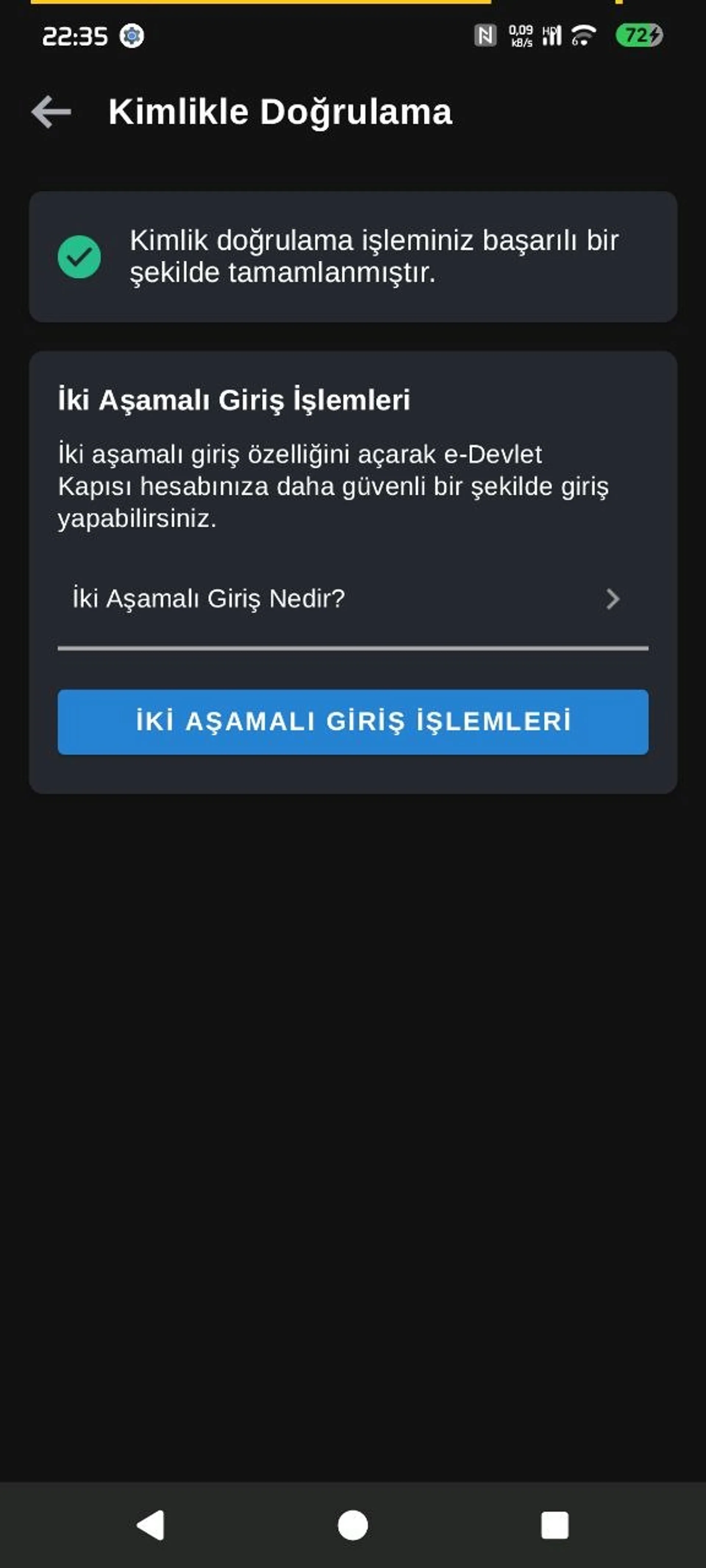
Part 4/5I couldn't complete the phone number verification e-Devlet requires for two-step login via NFC on my Redmi phone running crDroid. The first warning I encountered was related to redirecting the phone to a permission screen found on Xiaomi-branded devices. However, I didn't start by looking directly at the software; first, I suspected there might be a problem with the NFC hardware.
After all, we are using a custom ROM. Sometimes hardware features may not work properly on the ROM side. If this were such a problem, I would expect the ROM developer or users to mention it. Still, I didn't want to act on assumptions. I downloaded NFC Tools from the Google Play Store and ran an NFC reading test. Bam! NFC worked without any issues.
Here is the ROM I use:
- Device: Redmi Note 12 Pro / Pro Plus 5G
- ROM: crDroid 12.12
- Android: 16
- ROM device codename:
rubyx - Maintainer:
YagizErdemir06 - Build date: September 16, 2026
You can find the version and device information on the ROM's official crDroid download page. I also like the fact that the developer is Turkish. :)
If you're wondering how I installed crDroid on my Redmi Note 12 Pro 5G, take a look at the crDroid Installation Guide for Redmi Note 12 Pro 5G (ruby) I wrote earlier. I described the installation process step by step based on my own experience.
After confirming that the NFC hardware worked, I started investigating the source of the problem. I checked Android's permission status and device properties with ADB. Then I tried temporarily changing the manufacturer information using FolkPatch's APM module system. Since I didn't think this global change would be suitable for everyday use, I later prepared a solution that affected only the e-Devlet app using SpoofMyDevice and LSPosed.
In my final test, I successfully logged in to e-Devlet. Let me explain step by step what I did and which checks I used to verify the result.
How did the problem arise?#
The first test I ran with NFC Tools showed no hardware issues. But when I started the two-step login process through e-Devlet, I saw this warning:
To authenticate using NFC, you need to enable NFC permission in the Other Permissions section of the e-Devlet app settings on Xiaomi-branded devices.
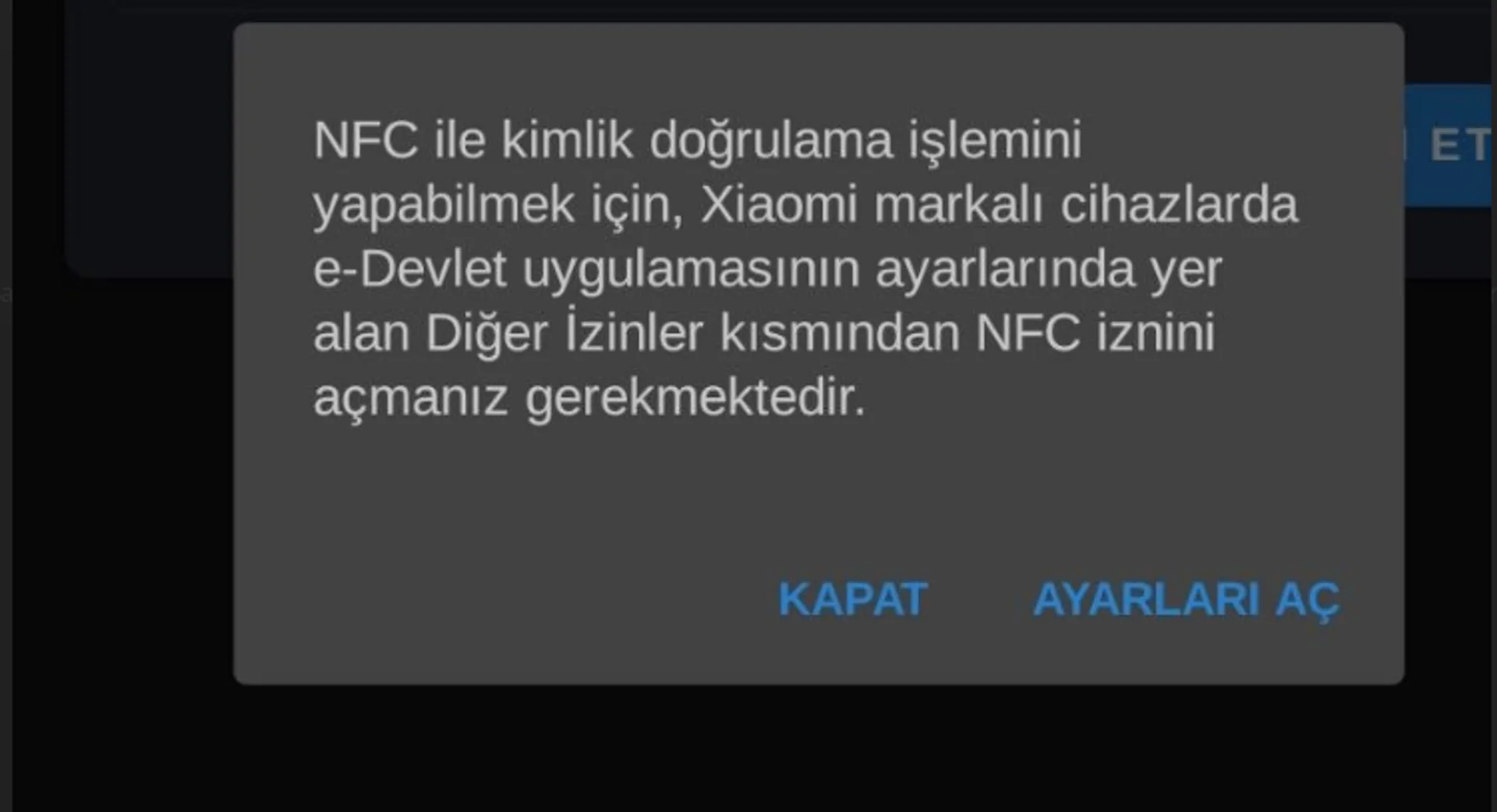 The strange thing was that there was no such NFC toggle in crDroid's app permissions screen. That's because the ROM I was using wasn't MIUI; the Xiaomi permission manager e-Devlet directed me to wasn't present on the system either.
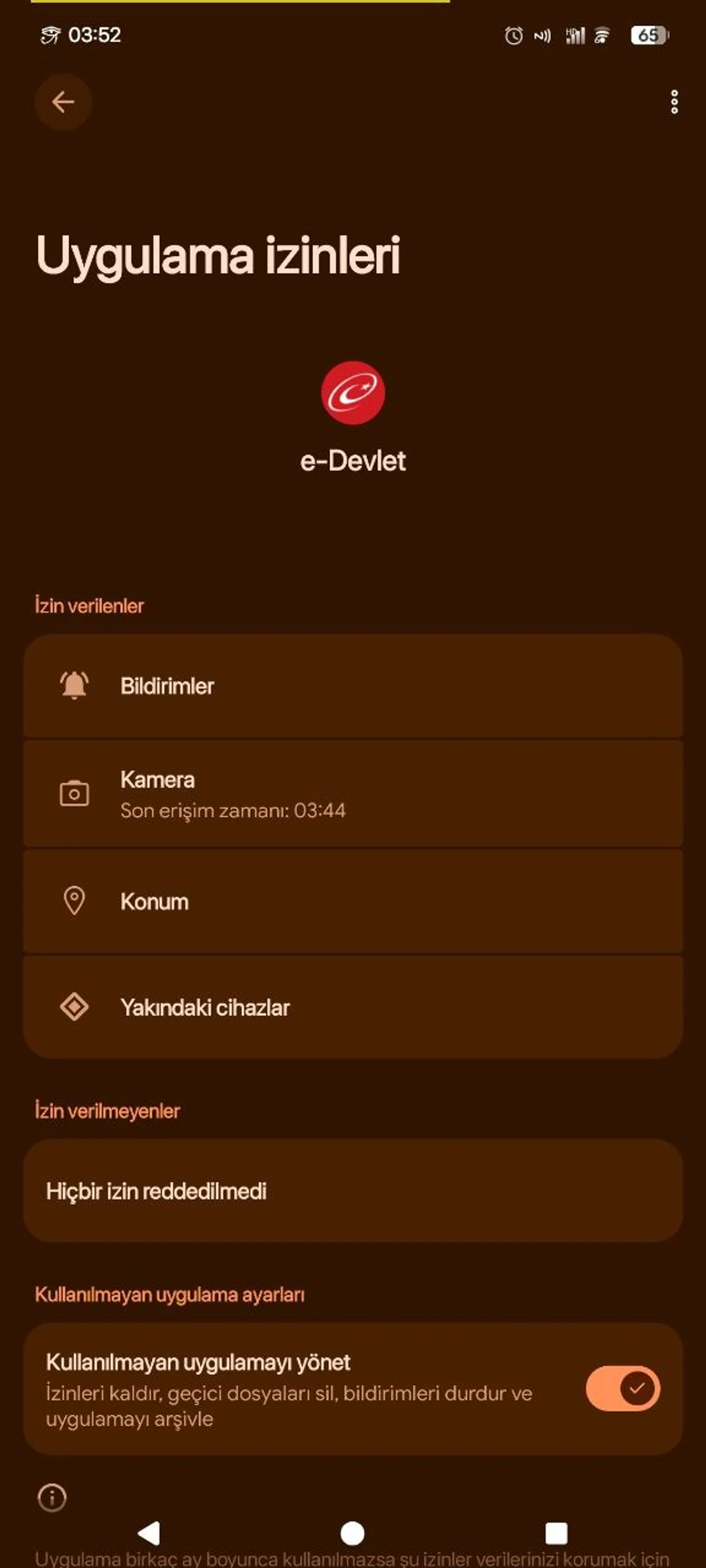 The path described by the app was roughly Settings → Additional settings → Other permissions → NFC. When I couldn't get to this screen, I began to think the problem wasn't just related to the NFC hardware.
The MIUI components that the app tried to open also appeared in the Logcat output:
START ... com.miui.securitycenter/
com.miui.permcenter.permissions.PermissionsEditorActivity
result code=-92

START ... miui.intent.action.APP_PERM_EDITOR
com.miui.securitycenter/
com.miui.permcenter.permissions.AppPermissionsEditorActivity
result code=-92
Here, com.miui.securitycenter and miui.intent.action.APP_PERM_EDITOR are related to MIUI's permission management. Since these components weren't present on crDroid, I couldn't reach the MIUI screen the app was trying to open.
I couldn't independently verify exactly which internal error state the result code=-92 value represents. So I'm not assigning it a definitive meaning based only on the component and Intent names.
Was the NFC permission actually missing?#
One of my first suspicions was that crDroid had disabled NFC access for e-Devlet. When I couldn't find an NFC option in Android's standard app permissions screen, I checked this with ADB.
First, I tried this command:
adb shell pm check-permission android.permission.NFC tr.gov.turkiye.edevlet.kapisi
On the ROM I was using, pm didn't recognize this subcommand and returned Unknown command: check-permission. Instead, I inspected the package details through dumpsys:
adb shell dumpsys package tr.gov.turkiye.edevlet.kapisi \
  | grep -i -C 4 'android.permission.NFC'
The output showed the NFC permission as follows:
android.permission.NFC: granted=true
This finding was important: the standard NFC permission granted to the app by Android was already defined and granted.
That's because the android.permission.NFC permission in Android has a normal protection level. This permission isn't a dangerous runtime permission that the user must separately approve from the Settings screen, as with camera or location access. Android's developer documentation lists the NFC permission this way: Android Manifest.permission — NFC.
Therefore, not seeing a separate NFC toggle in Settings didn't, by itself, mean the NFC permission hadn't been granted. The Nearby devices permission shown on the screen wasn't a substitute for the NFC permission either; they are different permissions with different uses.
The device was recognized as Xiaomi, not MIUI#
As a next step, I checked Android's device properties:
adb shell getprop ro.product.manufacturer
Output:
Xiaomi
I also checked the MIUI version property:
adb shell getprop ro.miui.ui.version.name
This command returned an empty output. In other words, the device was identified as Xiaomi by its manufacturer, but the MIUI version property was absent.
I also listed the other device properties:
ro.product.brand: Redmi
ro.product.device: ruby
ro.product.manufacturer: Xiaomi
ro.product.model: 22101316I
ro.product.name: ruby_in
There's one small detail here: the ROM target's codename is listed as rubyx on the crDroid download page. The values above are Android product properties I read on the device using ADB. They are names used for different purposes, so the device codename on the ROM download page shouldn't be confused with the system properties.
At this point, the information I had amounted to the following:
- The first reading test I ran with NFC Tools succeeded.
- The phone's NFC permission had been granted on the Android side.
- The Intent calls trying to open the MIUI permission manager appeared in the logs.
- The system reported the device manufacturer as
Xiaomi. - The MIUI version property was empty and the ROM was crDroid.
These findings made it more likely that the e-Devlet app saw the Xiaomi manufacturer and may have entered a MIUI-specific permission flow. However, without access to the app's source code or confirmation from its developer, it's not possible to say for certain that this is the exact check it uses.
Android's Build.MANUFACTURER field represents the manufacturer information. The AOSP source code shows that this field is read from the ro.product.manufacturer system property: Android Open Source Project — Build.java.
Identifying the root manager and FolkPatch tools#
At this point, I considered temporarily changing the manufacturer property. First, I needed to clarify the root setup on the phone.
I described how I rooted this device in a separate guide. You can find details of the process I performed on the Redmi Note 12 Pro 5G using MTKClient and FolkTool in Rooting the Redmi Note 12 Pro 5G: MTKClient and FolkTool. Instead of repeating the root installation in this article, I'll focus on how I used the existing FolkPatch setup to solve the e-Devlet problem.
First check:
adb shell su -c id
Output:
uid=0(root) gid=0(root) groups=0(root) context=u:r:magisk:s0
At first glance, the magisk expression in the SELinux context can be confusing. However, this line alone doesn't prove that the Magisk app is installed on the phone; the expression shown here is the process's SELinux context.
When I searched the installed packages, I found this package:
package:me.yuki.folk
FolkPatch was the root manager I used. I also checked FolkPatch's tools directory:
adb shell su -c 'ls -la /data/adb/ap/bin/'
The resetprop tool was in this directory and appeared as a symbolic link to /data/adb/apd:
resetprop -> /data/adb/apd
The tool's help output described it as a "Magisk-compatible system property tool," but that alone doesn't mean Magisk is installed. FolkPatch uses its own APM module mechanism and the resetprop tool in that mechanism to apply system properties. The FolkPatch APM documentation explains that the system.prop file applies system properties through resetprop and uses the same key=value format as build.prop.
Testing a manufacturer information change with FolkPatch APM#
For my first attempt, I changed only the ro.product.manufacturer property rather than changing the entire device identity. I didn't change the Redmi brand, model, device codename, or product name.
Two files were sufficient for the APM module: module.prop and system.prop. I created the ZIP package on my Arch Linux computer using Python:
python - <<'PY'
from pathlib import Path
from zipfile import ZipFile, ZIP_DEFLATED

output = Path.home() / "edevlet-miui-check.zip"

files = {
    "module.prop": """id=edevlet_miui_check
name=e-Devlet MIUI Check Test
version=1.0
versionCode=1
author=friday13
description=Temporary manufacturer property compatibility test
""",
    "system.prop": """ro.product.manufacturer=AOSP
""",
}

with ZipFile(output, "w", ZIP_DEFLATED) as archive:
    for filename, content in files.items():
        archive.writestr(filename, content)

print(f"Module created: {output}")
PY
This command created the edevlet-miui-check.zip file in my home directory. Then I sent it to the phone's Downloads directory with ADB:
adb push ~/edevlet-miui-check.zip /sdcard/Download/
I applied the ZIP package through FolkPatch's APM module system. The only property in the module's system.prop file was:
ro.product.manufacturer=AOSP
Result of the first test#
I checked whether the change had been reflected in the system property with this command:
adb shell getprop ro.product.manufacturer
This time, the output was not Xiaomi but:
AOSP
This confirmed that the manufacturer property could be changed through APM. However, this test only showed that the system property had changed. I didn't yet know how e-Devlet used this information or whether the NFC verification flow had been fixed.
Could this change affect banking apps?#
Yes, it could; however, I can't say how a particular app would behave based only on this property change.
ro.product.manufacturer is a system property that applies device-wide. Therefore, this isn't a change specific to e-Devlet. Apps that use Android's Build.MANUFACTURER value may see the manufacturer information as AOSP. If an app's device compatibility or manufacturer-specific behavior depends on this field, unexpected results may occur. Some apps may not use this value at all; others may evaluate it together with other device information and security signals.
For this reason, I'm not claiming that banking apps will definitely break or that there definitely won't be any problems. Changing the manufacturer information globally also doesn't remove root or device integrity checks. It only changes one of the manufacturer fields Android exposes to apps.
That's why I decided not to use the global APM test module as a permanent solution. I disabled the module and checked that the manufacturer information was Xiaomi again after rebooting:
adb shell getprop ro.product.manufacturer
The output was once again:
Xiaomi
This reverted the device-wide change. I was now looking for a method that would affect only the e-Devlet app.
Per-app manufacturer information with SpoofMyDevice#
Instead of changing the global system property, it made more sense to change the device information visible to the app in its own process. For this, I used the SpoofMyDevice project, which works as an Xposed/LSPosed module.
SpoofMyDevice lets you assign separate device profiles to different apps and enable individual device fields within each profile. That's exactly what I needed: to change the manufacturer information only for e-Devlet.
Here are the steps I followed for installation and configuration:
- I installed the SpoofMyDevice APK on the phone and opened the app once.
- I enabled the SpoofMyDevice module in the LSPosed manager.
- I added only the e-Devlet app to the module's scope.
- I created a profile in SpoofMyDevice.
- I enabled only the Manufacturer field in the profile and set its value to
AOSP. - I assigned the profile I created to the e-Devlet app.
I was particularly careful not to change any of the other device fields. The brand remained Redmi, the model remained 22101316I, and the device codename remained ruby. I also didn't add Android System Framework to the LSPosed scope; I didn't want the change to spread system-wide.
After this configuration, I checked the global system property again:
adb shell getprop ro.product.manufacturer
The output was still:
Xiaomi
This was the expected result, because I was no longer changing the global ro.product.manufacturer value. SpoofMyDevice would run through LSPosed only in the process of the app included in its scope.
Are LSPosed and SpoofMyDevice really working?#
It wasn't enough for me that the app opened or that the profile appeared to be assigned. I wanted to see that the change had actually been loaded into the e-Devlet process.
First, I completely closed e-Devlet:
adb shell am force-stop tr.gov.turkiye.edevlet.kapisi
Then I reopened the app on the phone and checked the Logcat output:
adb logcat -d -v time | grep -iE \
'SpoofMyDevice|LSPosed|lspd|edevlet'
First, I saw in the logs that LSPosed had attached to the e-Devlet process:
I/LSPosedFramework:
(tr.gov.turkiye.edevlet.kapisi)
SpoofMyDevice: Loading hooks for tr.gov.turkiye.edevlet.kapisi
This line showed that the module had started running in the e-Devlet app's own process.
Next, the logs reported that the configuration had been read successfully:
SpoofMyDevice: Config initialized successfully
The next important line was:
SpoofMyDevice: Profile loaded after Application.attach for tr.gov.turkiye.edevlet.kapisi
In other words, the profile had loaded as the e-Devlet app process was being created.
Hooks related to the Manufacturer and Build fields also appeared in the logs:
DeviceSpoofLab-Build: Build fields and getSerial hooked
SpoofMyDevice: BuildHooks loaded
Finally, there was a line indicating that the module had started all its hooks:
SpoofMyDevice: All hooks initialized for tr.gov.turkiye.edevlet.kapisi
This output was important to me. I could now see not only that LSPosed was installed, but also that SpoofMyDevice had loaded the configuration in the e-Devlet process and started the Build hooks.
One technical detail needs to be distinguished here: the logs confirm that the hooks were loaded; they don't directly print the Build.MANUFACTURER value read by e-Devlet as AOSP. Therefore, I'm not claiming that the log output alone let me definitively measure the value the app saw. The important check for that was to try the actual usage flow again.
Final test: successful login to e-Devlet#
After completing the configuration, I reopened the e-Devlet app and tried the login flow that had caused the problem before.
This time, the login process completed successfully. The MIUI permission screen redirection issue I had encountered in previous attempts no longer prevented me from logging in.
This gives us three separate verifications:
- Global system property: The output of
getprop ro.product.manufacturerremainedXiaomi. - App-level hook: Logcat showed that the SpoofMyDevice profile was loaded in the e-Devlet process and that the Build hooks were started.
- Real-world usage test: After the configuration, I successfully logged in to e-Devlet.
This result shows that, on my device and with my crDroid configuration, changing the manufacturer information on a per-app basis helped me get past the problem. However, I can't guarantee that the same result will be achieved with different ROM versions, e-Devlet app versions, or devices.
Conclusion#
At first, I suspected the NFC hardware. The first reading test I ran with NFC Tools showed that the hardware worked. Then, in my ADB investigation, I saw that Android's standard NFC permission was already granted=true. What stood out was that e-Devlet was trying to open a MIUI permission manager that wasn't present on crDroid.
My first attempt was to set the manufacturer information globally to AOSP with FolkPatch APM. But since this change could affect all apps, I didn't want to leave it in place for everyday use. With SpoofMyDevice and LSPosed, I was able to apply the same change only to the e-Devlet app.
The best part for me was not having to change the rest of the system. While other apps continued to see the device's actual manufacturer information, I could use a separate profile for e-Devlet.
The method in this article doesn't install the MIUI permission manager on crDroid or change the NFC hardware. It only changes the device information the app sees on a per-app basis. This was the approach that worked for the problem I encountered.