This article is older than 2 years. Some information might be outdated.
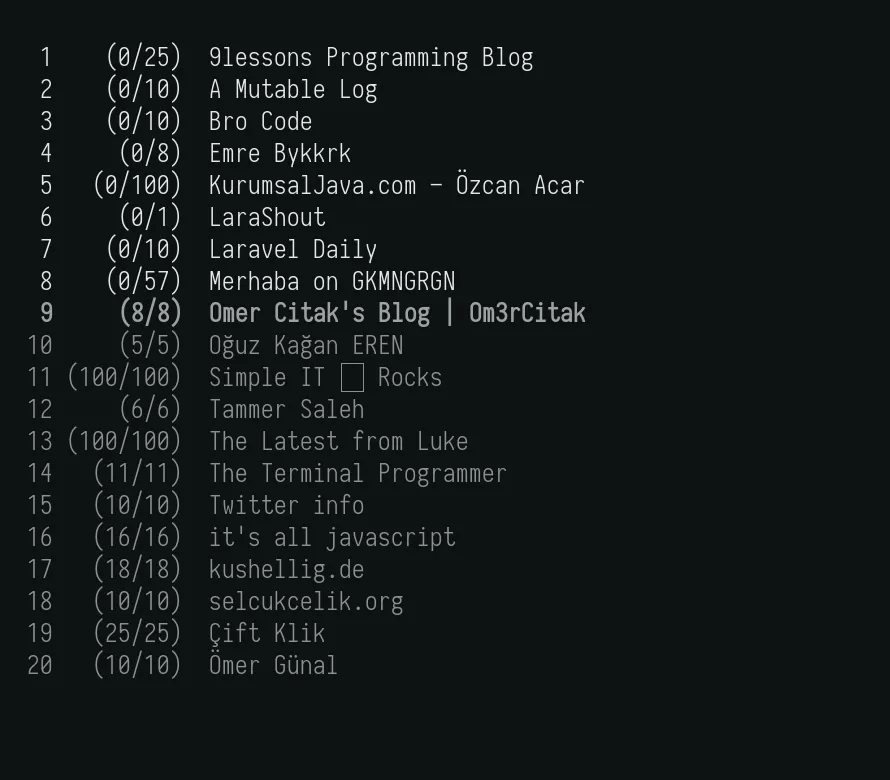
What is Newsboat? 📰#
Newsboat is a powerful terminal-based RSS/Atom feed reader. It is ideal for tracking blog posts, news and other content. It runs on Unix-like systems and offers flexible configuration options.
Installing Newsboat 🛠️#
You can install Newsboat and additional tools with the following commands:
yay -S newsboat mpv youtube-dl dunst
- Mpv: Media player (used to play videos).
- youtube-dl: Used to download video content in RSS.
- Dunst: For desktop notifications (required for i3-wm users, not mandatory for other desktop environments).
Configuration 🛠️#
Newsboat's configuration file is located in ~/.config/newsboat/config. An example configuration:
browser "xdg-open"

macro o set browser "/usr/bin/mpv %u > /dev/null 2>&1 &" ; open-in-browser ; set browser "xdg-open"

macro y set browser "youtube-dl %u"; open-in-browser ; set browser "xdg-open"

#general stuff

show-read-articles yes

show-read-feeds yes

auto-reload yes

cleanup-on-quit no

max-items 100

feed-sort-order title-desc

mark-as-read-on-hover yes

display-article-progress yes

max-browser-tabs 10

show-keymap-hint no

feedlist-format "%4i %9u %t" #"%t %d %u %U %c %S %n"

articlelist-format "%4i %D %?T? %-10T ?%t"

feedlist-title-format ""

articlelist-title-format ""

# reload-threads 4

# reload-time 90

# reload-only-visible-feeds yes

cache-file "~/.config/newsboat/cache.db"

# notifications

notify-format "Newsboat: %d new"

notify-program "/usr/bin/notify-send"

#keybinds

bind-key j down

bind-key k up

bind-key l open

bind-key h quit

unbind-key g # bound to `sort` by default

bind-key g home

bind-key s sort

unbind-key G # bound to `rev-sort` by default

bind-key G end

bind-key O open-all-unread-in-browser-and-mark-read

unbind-key r

bind-key r reload-all

color background default default

color listnormal default default

color listnormal_unread green default

color listfocus yellow default bold

color listfocus_unread yellow default bold

color info default default

color article magenta default

# highlights

highlight article "^(Title):.\*$" red default

highlight article "https?://[^ ]+" blue default

highlight article "\\[image\\ [0-9]+\\]" green default

# Killfiles

#ignore-article "\*" "title =~ \"Väder\""

#ignore-article "\*" "title =~ \"Rugby\""

#ignore-article "\*" "title =~ \"Uutiset\""

#ignore-article "\*" "title =~ \"Kulturnyheterna\""

#ignore-article "\*" "title =~ \"från dagen\""
URL List 🌐#
RSS feed addresses are added to the ~/.config/newsboat/urls file. Example:
# Blog

http://feeds.feedburner.com/kushellig
https://sunaku.github.io/index.atom
https://lukesmith.xyz/rss.xml
https://feeds2.feedburner.com/9lesson
https://tewarid.github.io/feed.xml
https://sushankpokharel.com.np/feed/
http://ciftklik.blogspot.com/feeds/posts/default
http://www.emrebuyukkurkcu.com/feed/
https://itsalljs.com/rss.xml
http://www.kurumsaljava.com/feed/
https://www.larashout.com/feed
https://laraveldaily.com/feed/
https://gokmengorgen.net/tr/index.xml
http://oguzkaganeren.com.tr/index.php/feed/
https://omercitak.com/feed/
https://ogunal.com/feed/
http://selcukcelik.org/feed/
https://simpleit.rocks/index.xml
https://twitteinfo.com/feed/
http://feeds.feedburner.com/TammerSaleh

# deactive

# https://www.datafloyd.com/tr/feed/
Useful Shortcuts ⌨️#
| Shortcut | Function |
|---|---|
| A | Mark all as read |
| O | Open in web browser |
| J/K | Move Down/Up |
| Q | Quit |
| R | Refresh RSS feeds |
YouTube RSS 📺#
To add YouTube channels you subscribe to Newsboat:
- Go to YouTube Subscriptions Page.
- Download your file with the "Export to RSS readers" option.
- Import RSS addresses with the following command:
youtubebotu -i subscription_manager
Using Newsboat More Efficiently 🎯#
You can define aliases for heavy RSS usage. For example:
alias haberbotu="newsboat -u ~/.config/newsboat/haberurls -C ~/.config/newsboat/config"
alias youtubebotu="newsboat -u ~/.config/newsboat/yturls -C ~/.config/newsboat/ytconfig"
This way, you can access specific RSS feeds directly by using haberbotu or youtubebotu commands in the terminal.
For more information, you can check the Newsboat Documentation page. 📖
Comments