So you've just published a brand new blog post, but Bing takes ages to visit your site and index it? 😤 Waiting days for search engine spiders to discover your content feels as painfully slow as waiting for your turn to play Space Cadet Pinball in the morning freeze back in high school.
If you are a paranoid developer like me, running Arch Linux and wanting to control every single piece of your system, sitting around and waiting for search engines to crawl you is absolute torture. But what if you could notify Bing of any changes on your site "instantly"? That is where Bing IndexNow usage comes in to change the game.
What is Bing IndexNow? 🤔#
IndexNow is a super simple yet powerful protocol that lets you instantly "ping"1 search engines when a change occurs on your site (like publishing a new post, updating an old one, or deleting a page). Instead of submitting a sitemap and waiting for their crawlers' convenience, you knock on their door and say: "New content is ready, come crawl it now!"
And no, we won't be doing this process manually every time. We are going to completely automate this using a modern, smart CLI utility.
Note: Not Just Bing!
When you use the IndexNow protocol, the URLs you submit are automatically shared not just with Bing, but also Yandex and other participating search engines. You reach multiple search engines with a single action!
🔧 A Modern Solution: Google & Bing Indexing Tool#
We previously set up a similar structure for Google in our Google Indexing API Guide article. Now it's Bing's turn!
Dealing with raw scripts or running manual commands every day is a cheap student meal solution. Since we aim for professional workflows, we should do things in a clean and organized way.
To resolve indexing issues across all my projects, I developed the open-source Google Indexing Tool. It automates the whole process and handles both Google and Bing IndexNow submissions out-of-the-box.
The best part? You can install this tool globally on your system and run it across all your different blog directories with a single command.
📦 Global Installation and Setup#
Open your terminal and install the tool directly from GitHub:
pip install git+https://github.com/yuceltoluyag/google-indexing-tool.git
This command installs a global google-indexer command. Now, you can manage indexing from any of your blog folders.
Create a config.ini file in your blog's root directory and fill it out:
[PELICAN]
ARTICLES_PATH = content/articles
SITE_URL = https://yuceltoluyag.github.io/

[DEFAULT]
CSV_FILE = article_links.csv
SERVICE_ACCOUNT_FILE = service-account.json
LOG_FILE = indexing.log

[API]
URL = https://indexing.googleapis.com/v3/urlNotifications:publish
REQUEST_DELAY_SECONDS = 10
COOLDOWN_DAYS = 3

[BING]
API_KEY = your_bing_indexnow_api_key
KEY_LOCATION = https://yuceltoluyag.github.io/your_bing_indexnow_api_key.txt
Tip ⚡ API Key and Verification
In the API_KEY field, enter the IndexNow API key generated from your Bing Webmaster Tools dashboard. The KEY_LOCATION is the public URL of the .txt file containing your key. Bing reads this file to verify that you actually own the domain.
⚙️ Step-by-Step Automation Workflow#
Once configuration is set, navigate to your blog directory and execute the following commands:
Step 1: Export Pelican Posts to the Tracking DB#
Scan all published articles on your site and append any new entries to the tracking file article_links.csv:
google-indexer export
This file serves as a simple database tracking when each URL was sent to Google or Bing. Run this command whenever you update your site to keep the records updated.
Step 2: Batch Submit to Bing IndexNow#
Here is a critical detail: instead of sending requests one by one, Bing accepts all your new URLs in a single batch package:
# Run a dry-run simulation first to see what gets submitted:
google-indexer bing --dry-run

# Submit to Bing for real:
google-indexer bing
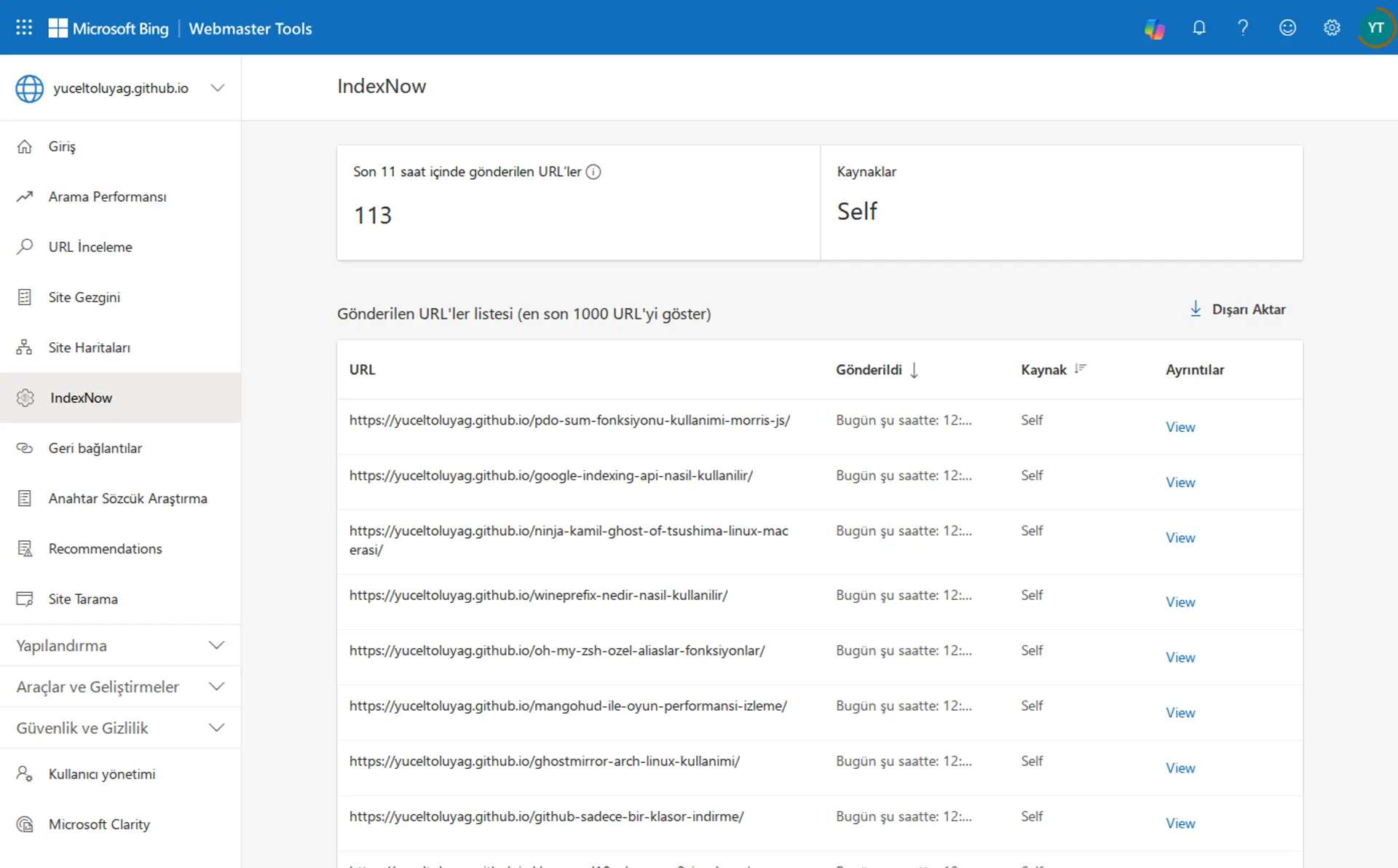
That's all! Once you receive a Status Code: 200 or 202 response and see the "CSV file updated" message in your terminal, your URLs have successfully reached Bing and are marked with a timestamp to avoid redundant submissions.
📋 What We Learned#
- Instant Ping: Search engines learn about new posts instantly via the IndexNow protocol.
- Single-command Automation: The
google-indexertool lets you submit all new posts to Bing in one go. - Multi-engine Reach: Pinging Bing automatically shares the update with other participating engines.
- Smart Database: The tool keeps track of sent URLs to avoid wasting API limits.
🎯 Conclusion#
As you can see, using automatic Bing IndexNow means you no longer have to wait on search spiders to find your content. With this simple yet robust automation, you can give your site's SEO performance a massive boost.
Have you tried this system or are you planning to set it up? Share your thoughts and questions in the comments below! 👇
-
Ping: In computer networks, sending a small data packet to a destination to verify if it is reachable, or notifying a service of status updates instantly. ↩
Comments