Hello! 👋#
I had been planning to write such an article for a long time but never found the opportunity. 😊 In this article, I will talk about applications I frequently use and recommend on Windows, Linux and Android platforms. I hope it will be useful! 🚀
I want to turn this article into a series. Let's see if I can do it? 🤞
Comodo Firewall (Firewall) 🔥#
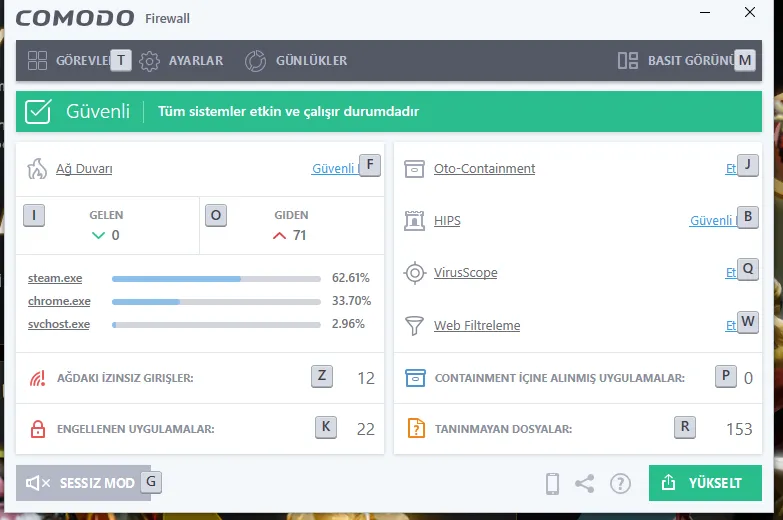
I'm using the free version which includes many features such as container (virtual environment), antivirus, secure browser. You can run files you don't trust in a virtual environment. A similar feature was also introduced in Windows 10 with Windows Defender.
Additionally, you can monitor your network traffic and examine which application sends data where. It's a great option for those who are sensitive about security! 🛡️
KeyScrambler 🔑#
This program protects against possible keylogger attacks by instantly encrypting the keys you press on the keyboard. If your computer is infected with malicious software, you can protect your passwords and sensitive data. 💻🛡️
You can download the program from here. After installation, restart your computer and view the encryption process in any corner of the screen.


0patch 🛠️#
I used this application a lot especially during the Windows 7 period. When critical security vulnerabilities emerge, it provides temporary protection by providing mini patches (micro patches). I'm also using it on Windows 10. It can be quite useful especially for corporate companies.
Don't ask "Who am I in terms of security?", it's always good to take precautions! 😊
uBlock Origin 🚫#
After claims that popular ad blockers like AdBlock collect user data, I started using uBlock Origin, an open source alternative. It's an extremely lightweight and powerful ad blocker!
Recently I'm also using Pi-hole and I'm really satisfied. If you're looking for a network-based ad blocker, you should definitely check it out. 😁
Ad-Free YouTube Experience on Mobile: Vanced App 📺#
Are you tired of the official YouTube app? Tired of constant ads popping up? Do you want background playback feature? Then the solution is: YouTube Vanced! 🎉
I've been using this application for about a year and I'm very satisfied. To follow your subscriptions, you need to install the helper application called MicroG before installing the application. Otherwise, you may get an error when logging in.
WhatsApp Aero 📱#
WP Aero, an advanced version of WhatsApp, offers great features in terms of privacy and personalization:
- Read messages without being seen 👀
- Secretly view stories 🎭
- Choose who can call you 📞
- Share longer videos 🎥
Also available is Insta Aero developed by the same group. It makes your job much easier when you don't want to be disturbed via WhatsApp!
💡 In the second part of this series, I will recommend more programs and applications!
See you in Part 2! 🚀
Comments