Series: mutt
Part 2/2# Modern mutt setup part 1 while explaining the remote parts, I mentioned how important they are. When each email has its own interface, its own remote tag, and tags that change by language, how will we learn them? We can learn this using IMAP and OpenSSL.
Suggestions for Windows users:
- nmap
- ncat
- telnet
- I recommend Cmder terminal for Windows users. You can download the full version from Cmder and extract it to any directory you want. It's a Swiss army knife-like terminal that can be customized as needed, new applications can be added, etc. You may not even need these applications 😃
Let's Start 🥗#
How to Establish Connection?#
Open the terminal and enter the following command. I shared the IMAP addresses and ports in the first part.
openssl s_client -crlf -connect imapaddress:imapport
For example, for Gmail:
openssl s_client -crlf -connect imap.gmail.com:993
When you establish the connection, the output will be as follows:
openssl s_client -crlf -connect imap.gmail.com:993 #output when we establish the connection is as below
CONNECTED(00000003)
depth=2 OU = GlobalSign Root CA - R2, O = GlobalSign, CN = GlobalSign
verify return:1
depth=1 C = US, O = Google Trust Services, CN = GTS CA 1O1
verify return:1
depth=0 C = US, ST = California, L = Mountain View, O = Google LLC, CN = imap.gmail.com
verify return:1

---

Certificate chain
0 s:C = US, ST = California, L = Mountain View, O = Google LLC, CN = imap.gmail.com
i:C = US, O = Google Trust Services, CN = GTS CA 1O1
1 s:C = US, O = Google Trust Services, CN = GTS CA 1O1
i:OU = GlobalSign Root CA - R2, O = GlobalSign, CN = GlobalSign

---

Server certificate
-----BEGIN CERTIFICATE-----
MIIFizCCBHOgAwIBAgIQSZ4s/w5MW9AIAAAAACh6JTANBgkqhkiG9w0BAQsFADBC
MQswCQYDVQQGEwJVUzEeMBwGA1UEChMVR29vZ2xlIFRydXN0IFNlcnZpY2VzMRMw
EQYDVQQDEwpHVFMgQ0EgMU8xMB4XDTIwMDEwNzE1NDYyNloXDTIwMDMzMTE1NDYy
NlowaDELMAkGA1UEBhMCVVMxEzARBgNVBAgTCkNhbGlmb3JuaWExFjAUBgNVBAcT
DU1vdW50YWluIFZpZXcxEzARBgNVBAoTCkdvb2dsZSBMTEMxFzAVBgNVBAMTDmlt
YXAuZ21haWwuY29tMIIBIjANBgkqhkiG9w0BAQEFAAOCAQ8AMIIBCgKCAQEAsph6
cVQ3bTFdVlqTInrbAu7QKRBCAf90BUpBLBGKDnlbLzXwmZVUuS7xWX5SHF9koZws
Qu8HGpO/+cBhnJpJuxdG1Y/Gy5VptvpTdli9N6pEYft2adW+7s+9AujX5Z/jEegJ
Qb/UscPGSb1gY8qngAEY6XwTUvope7Ec2gwoVFLsDy/gxgbPigfkJkT4CbS5YdE1
LF3QSFEfJcUvs8hiUf3JNnxs0ezo7CvdnzSaP5PDK1N8oAgFadiuvu2yqRGDz+nS
NZ7Gpe6u0nsDwBhSllDZi1mXhPPHZkt9oJblGwZUsUchKafWTkHygnnAWhUfVCsa
/p9F3NfXe8j4b3oQaQIDAQABo4ICVTCCAlEwDgYDVR0PAQH/BAQDAgWgMBMGA1Ud
JQQMMAoGCCsGAQUFBwMBMAwGA1UdEwEB/wQCMAAwHQYDVR0OBBYEFKTviEQVTOR4
NbR4ewIbKc7wHXB9MB8GA1UdIwQYMBaAFJjR+G4Q68+b7GCfGJAboOt9Cf0rMGQG
CCsGAQUFBwEBBFgwVjAnBggrBgEFBQcwAYYbaHR0cDovL29jc3AucGtpLmdvb2cv
Z3RzMW8xMCsGCCsGAQUFBzAChh9odHRwOi8vcGtpLmdvb2cvZ3NyMi9HVFMxTzEu
Y3J0MBkGA1UdEQQSMBCCDmltYXAuZ21haWwuY29tMCEGA1UdIAQaMBgwCAYGZ4EM
AQICMAwGCisGAQQB1nkCBQMwLwYDVR0fBCgwJjAkoCKgIIYeaHR0cDovL2NybC5w
a2kuZ29vZy9HVFMxTzEuY3JsMIIBBQYKKwYBBAHWeQIEAgSB9gSB8wDxAHcAsh4F
zIuizYogTodm+Su5iiUgZ2va+nDnsklTLe+LkF4AAAFvgOZ+bwAABAMASDBGAiEA
wKGNVNodkS5wG4SDrVV97aUNB56udXSrE52Q1m4YrywCIQDmwoLDvyc65RIDpULs
V7Kz+2E7uLA37BR9Z8vrLiLtigB2AF6nc/nfVsDntTZIfdBJ4DJ6kZoMhKESEoQY
dZaBcUVYAAABb4DmfokAAAQDAEcwRQIhAITKSCZWe1QA+CY7ZXnf75JK2ZnVSeyb
nuBUJ//wNx8EAiAsizqrLyGYEuL6wMkT1D5XrrsHypPfiUJiTI/98DD5QDANBgkq
hkiG9w0BAQsFAAOCAQEAFectOcuNllA9v354a1SBNueLSel/41wbe+u6zHbXQECX
/nzQnFMhzoXzpxbW8oDL7/St1/rG8c4lQgUZbApXJMHxmuc3B78TQ3XD3WtspQDa
sWXxVoika6bGM0g1ZqeSfOJqDlFTsLTERS5gJ2zeBQVHr/s/H31NqcDq9IJdalW5
YTUiR/+LAeMPT3SdYT3wTAyW98WOJvs+9+ogk/P4qOICpxCj5ONjgNzOV5945+si
CEfPPGI7U7yP41gtGQ+wcP+YCjl+JvF3fkSG8ILvVNgIyfA6vLmdY/PxhziY2PvE
2rRai3TWCtbD1fFD1gNaMFoy/bVeznW/vKsfyxEHew==
-----END CERTIFICATE-----
subject=C = US, ST = California, L = Mountain View, O = Google LLC, CN = imap.gmail.com

issuer=C = US, O = Google Trust Services, CN = GTS CA 1O1

---

No client certificate CA names sent
Peer signing digest: SHA256
Peer signature type: RSA-PSS
Server Temp Key: X25519, 253 bits

---

SSL handshake has read 3020 bytes and written 396 bytes
Verification: OK

---

New, TLSv1.3, Cipher is TLS_AES_256_GCM_SHA384
Server public key is 2048 bit
Secure Renegotiation IS NOT supported
Compression: NONE
Expansion: NONE
No ALPN negotiated
Early data was not sent
Verify return code: 0 (ok)

---

---

Post-Handshake New Session Ticket arrived:
SSL-Session:
Protocol : TLSv1.3
Cipher : TLS*AES_256_GCM_SHA384
Session-ID: E242E98DD0920E64AF4B2641B9A931BFC546F55E0D861BF3A33D68EA2E7FEA7D
Session-ID-ctx:
Resumption PSK: 99759B4925E77039287FAB1D2370A25399A52B9F86B00A5FF4B3B88B90CB527C3B49AD50B9E43B25A63DB57F4B797384
PSK identity: None
PSK identity hint: None
SRP username: None
TLS session ticket lifetime hint: 172800 (seconds)
TLS session ticket:
0000 - 01 a5 17 3b ca fc 19 8c-2e f6 0b 41 a4 5c 72 e5 ...;.......A.\r.
0010 - 03 98 d1 b7 94 6e 88 bf-41 0c 18 00 3d 7f 84 82 .....n..A...=...
0020 - d3 fc 47 65 96 64 22 6a-00 6a 44 b5 97 51 d0 52 ..Ge.d"j.jD..Q.R
0030 - 3d 6a 45 73 55 87 b7 cf-de d8 56 61 69 72 15 37 =jEsU.....Vair.7
0040 - 3f 93 8d 71 c5 5f a4 3d-89 94 58 04 19 15 10 ba ?..q.*.=..X.....
0050 - 2c 24 1c 2c 3d 60 d7 aa-6c 00 db 8a 0b 01 4e 9d ,$.,=`..l.....N.
0060 - 22 94 70 7d 88 a0 74 2f-54 33 17 3e 8e 31 4b 22 ".p}..t/T3.>.1K"
0070 - 31 f8 2d 78 c3 76 8d 49-5e 03 4e 5e 1f f5 ea 85 1.-x.v.I^.N^....
0080 - a6 64 29 4d 93 16 6c 43-5a d6 8b 69 36 8c d4 37 .d)M..lCZ..i6..7
0090 - 64 2e 65 7d f2 37 d6 c4-69 33 89 13 fe 28 19 3f d.e}.7..i3...(.?
00a0 - 79 27 55 ce 6d 4a 75 4d-51 40 ec 3f 4b 49 05 db y'U.mJuMQ@.?KI..
00b0 - f6 fa 37 5e a1 a6 51 fb-29 20 e9 e3 25 02 fa cf ..7^..Q.) ..%...
00c0 - ad e4 d8 3c 7c ce a6 e8-9a 62 4e 07 54 77 12 5e ...<|....bN.Tw.^
00d0 - 8d ac 4a 01 37 c9 e4 08-07 5e e6 8a 3c 56 6a 4e ..J.7....^..<VjN
00e0 - 2f f0 17 49 d1 a1 c2 68-94 3f e5 d4 /..I...h.?..

    Start Time: 1580813085
    Timeout   : 7200 (sec)
    Verify return code: 0 (ok)
    Extended master secret: no
    Max Early Data: 0

---

## read R BLOCK

Post-Handshake New Session Ticket arrived:
SSL-Session:
Protocol : TLSv1.3
Cipher : TLS*AES_256_GCM_SHA384
Session-ID: 745DB735BC91D354E456B10AA8E6999F27107F2139031FB1EEC2EBA26E0BDD79
Session-ID-ctx:
Resumption PSK: 421152D3EDCA5D39BF9A1C8A57406065CFF0E63BDE3B4B8909E5F120AD845B965FA687CF8C01511527DF2324762949E1
PSK identity: None
PSK identity hint: None
SRP username: None
TLS session ticket lifetime hint: 172800 (seconds)
TLS session ticket:
0000 - 01 a5 17 3b ca fc 19 8c-2e f6 0b 41 a4 5c 72 e5 ...;.......A.\r.
0010 - f8 fe f0 f9 30 e4 40 b6-36 04 c1 ef 97 42 16 48 ....0.@.6....B.H
0020 - 29 75 5d 41 6e e2 0b 03-b4 89 cb a1 ae e9 1b 39 )u]An..........9
0030 - c9 65 aa f3 32 0b 0b c2-51 53 c6 ab 6d fc 94 76 .e..2...QS..m..v
0040 - 3c dc b5 e2 9f d7 7f 87-31 2c ad 7d c9 67 ef 0e <.......1,.}.g..
0050 - 69 7a fb 6e 38 04 2b 06-84 40 52 72 04 97 b4 25 iz.n8.+..@Rr...%
0060 - ef 56 b8 41 34 0d de 2d-e7 dd df 14 3c 16 6b 79 .V.A4..-....<.ky
0070 - ae a5 ee e7 4d 16 d3 52-1d ee 02 91 f5 ca cc 70 ....M..R.......p
0080 - 3b 34 ce bd c1 8b f3 f0-72 54 d9 61 15 38 4f b7 ;4......rT.a.8O.
0090 - 5c 74 f9 0d 41 4e 26 c5-d7 76 4e 56 6d 2e e5 11 \t..AN&..vNVm...
00a0 - 2b 7f f6 24 02 ce bf 8f-a7 90 9e 4e 1f ae cd c9 +..$.......N....
00b0 - c3 94 3a 04 e3 87 12 67-ab d8 09 c8 a3 0a 05 43 ..:....g.......C
00c0 - ad 80 e2 5c 5b a3 07 95-41 ef 99 e8 25 89 27 1b ...\[...A...%.'.
00d0 - 7e b9 55 69 a8 51 71 2b-1a 15 eb e2 ff 61 0e 19 ~.Ui.Qq+.....a..
00e0 - 11 ec 18 d3 95 de 3e 5f-a7 e8 cd a7 ......>*....

    Start Time: 1580813085
    Timeout   : 7200 (sec)
    Verify return code: 0 (ok)
    Extended master secret: no
    Max Early Data: 0

---

read R BLOCK

- OK Gimap ready for requests from 85.97.27.167 s14mb259413894edx

# at this point it waits for your email address and password.
Connecting to Mailbox#
After establishing the connection, you will be asked to enter your username and password.
tag login yourgmailaddress@gmail.com yourpassword
After connecting, you can use the following command to see mailboxes:
tag LIST "" "\*"
With this command you can see the remote names and folder structure. Since I use the Turkish interface, the list appears as follows:
- LIST (\HasNoChildren) "/" "INBOX"
- LIST (\HasChildren \Noselect) "/" "[Gmail]"
- LIST (\HasNoChildren \Sent) "/" "[Gmail]/G&APY-nderilmi&AV8- Postalar"
- LIST (\HasNoChildren) "/" "[Gmail]/INBOX"
- LIST (\HasNoChildren) "/" "[Gmail]/Sohbetler"
- LIST (\HasNoChildren \Junk) "/" "[Gmail]/Spam"
- LIST (\Drafts \HasNoChildren) "/" "[Gmail]/Taslaklar"
- LIST (\All \HasNoChildren) "/" "[Gmail]/Tüm Postalar"
- LIST (\Flagged \HasNoChildren) "/" "[Gmail]/Önemli"
- LIST (\HasNoChildren \Trash) "/" "[Gmail]/Çöp Kutusu"
- LIST (\HasNoChildren \Important) "/" "[Gmail]/Önemli"
Selecting Mailbox#
For example, if I want to access sent emails within muttrc, I should write [Gmail]/G&APY-nderilmi&AV8- Postalar in the remote part. If I write an incorrect remote tag, when I start neomutt, it gives an error like slave sent cannot be opened. You can skip this error and connect to the interface but you cannot access the sent emails part. I'm repeating REMOTE tag is very important.
Hotmail/Outlook Access#
Let's also look at Outlook/Hotmail, how are the folder structure and tags
openssl s_client -crlf -connect Outlook.office365.com:993
tag login myhotmailaddress.com yourpassword
tag LIST "" "\*"
- LIST (\HasNoChildren) "/" +INBOX
- LIST (\HasNoChildren) "/" Ar&AV8-iv
- LIST (\Marked \HasNoChildren) "/" Inbox
- LIST (\HasNoChildren \Junk) "/" Junk
- LIST (\HasNoChildren) "/" Outbox
- LIST (\Marked \HasNoChildren \Sent) "/" Sent
- LIST (\HasNoChildren) "/" junkemail
- LIST (\HasNoChildren) "/" Notes
- LIST (\HasNoChildren) "/" sentitems
- LIST (\HasNoChildren \Trash) "/" Deleted
- LIST (\HasNoChildren \Drafts) "/" Drafts
  tag OK LIST completed.
This way you can get the remote tags of all email interfaces that you know the imap and port addresses of.
Extra Information#
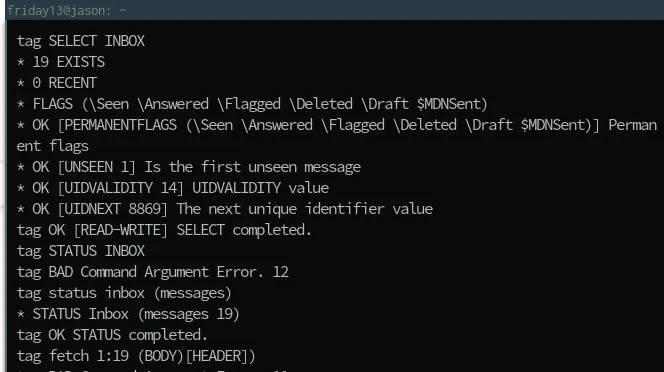
You can select the email box
tag SELECT INBOX
You can see how many messages are in the selected box
tag STATUS INBOX (MESSAGES)
Getting the headers of the message Let's assume the result of the above operation is 15. Let's get the headers of the last 10 emails
tag FETCH 5:15 (BODY[HEADER])
If we only want to retrieve the content parts
tag FETCH 15 (BODY)
Since the content parts are multipart (happens in reply to reply situations), if we want to see the index numbers
tag FETCH 6388 (BODY[n])
Comments