With the rise of AI-assisted development tools, Model Context Protocol (MCP) servers have also entered our lives. Thanks to this protocol, we can easily integrate different services with large language models like Qwen, perform browser automation, contextual analyses, and even create magical API connections.
In this guide, I will show you step by step how to activate MCP servers for Qwen 3, Qwen 3++ and Qwen3-Coder-Plus users. 🙂
1. What is MCP and Why is it Important?#
MCP (Model Context Protocol) allows language models to communicate with external services in a secure and standard way. For example:
- 🌐 You can perform browser automation with Puppeteer.
- 🧠 You can provide more planned reasoning with Sequential Thinking.
- 📊 You can add extra context and memory with services like Context7.
- ✨ You can produce API-based solutions with special plugins like Magic.
If you haven't read it before, check out our related article: Easily Start Browser Automation with MCP: Puppeteer Server Installation
2. Editing the .qwen/settings.json File#
The first step to activate MCP servers is to edit Qwen's settings file. Via terminal:
vim .qwen/settings.json
Add the following settings to the opened file:
{
  "selectedAuthType": "qwen-oauth",
  "mcpServers": {
    "puppeteer": {
      "command": "npx",
      "args": ["-y", "@modelcontextprotocol/server-puppeteer"]
    },
    "sequential-thinking": {
      "command": "npx",
      "args": ["-y", "@modelcontextprotocol/server-sequential-thinking"]
    },
    "context7": {
      "command": "npx",
      "args": ["-y", "@upstash/context7-mcp"]
    },
    "@21st-dev/magic": {
      "command": "npx",
      "args": ["-y", "@21st-dev/magic@latest", "API_KEY=\"your-api-key\""]
    }
  }
}
Warning The selectedAuthType field may be different for you. For example, you may have selected GitHub or another OAuth method. The example here is for reference only.
3. Starting Qwen CLI and Testing MCP Servers#
After making the settings, you can start the CLI. Type the following in the terminal:
qwen
When the CLI opens, you can use the /mcp command to see your active MCP servers:
/mcp
If everything is configured correctly, the servers you added earlier (for example puppeteer, sequential-thinking, context7, magic) will be listed. 🎉
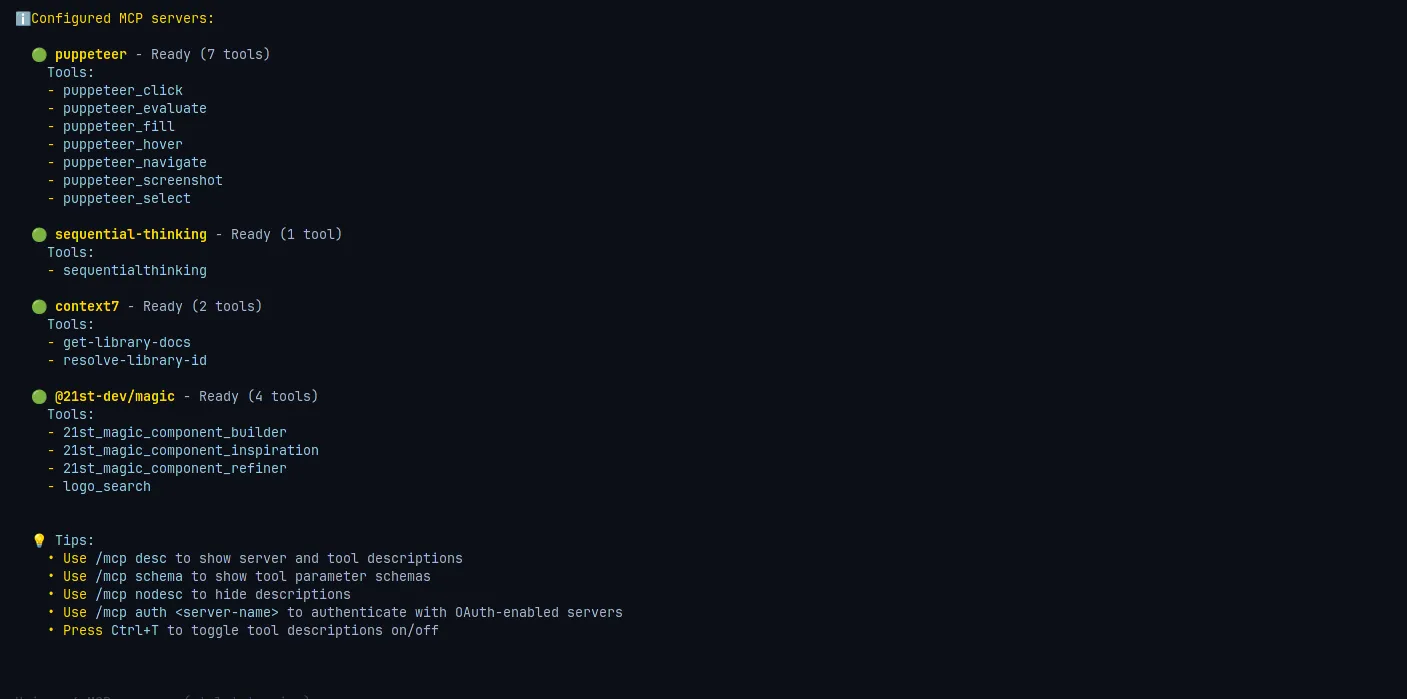
Hint If MCP servers are not visible in the CLI, first make sure npx and the relevant packages are installed. Then check the JSON format in the settings file.
4. Conclusion#
Now you know how to activate MCP servers on Qwen 3, Qwen 3++ and Qwen3-Coder-Plus. 🎯
- You edited the
.qwen/settings.jsonfile ✅ - You started the Qwen CLI ✅
- You tested that the servers are working with
/mcp✅
The rest is up to your imagination. Thanks to MCP, you can transform Qwen from just a language model into a powerful development assistant. 🚀
Comments