Series: ArchLampp
Part 4/4Hello 👋#
Valet Linux is a Laravel development environment for those who prefer a minimalist development setup. There is no need to configure Vagrant or /etc/hosts. You can easily share your sites publicly using local tunnels (Ngrok, etc.). 🚀
Valet configures your system to run Nginx in the background when the machine starts. Then, it directs your *.test domains to the relevant directories using DnsMasq. It offers a fast and lightweight Laravel development environment that runs using only 7MB of RAM. 🎯
Previous Installations If you have previously performed installations like Arch Linux Lampp Installation (PHP7x + MariaDB + MySQL + PhpMyAdmin) or similar, you should disable or uninstall them. Otherwise, conflicts may occur.
🛠 Installation#
Open the terminal and run the following commands sequentially:
pacman -S nss jq xsel networkmanager
Make sure PHP is installed and its version is higher than 5.6:
pacman -S php # For checking after installation: php -v
Install necessary additional PHP packages:
yay -S php71-mcrypt
Optional packages:
yay -S php php-dblib php-fpm php-gd php-odbc php-pgsql php-sqlite
Install Composer:
yay -S composer
Then add the following line to .bashrc:
PATH="$HOME/.config/composer/vendor/bin:$PATH"
Prepare Composer and install Valet Linux:
composer global require cpriego/valet-linux
🎉 Working with Valet#
Go to your home directory and create a folder named Sites:
mkdir ~/Sites
Each subfolder within this folder will act like a domain name. For example, let's create a Laravel project named blog and park it:
cd ~/Sites
php valet park
laravel new blog
You can view your project by going to http://blog.test in your browser! 🎊
🌍 Valet Link Command#
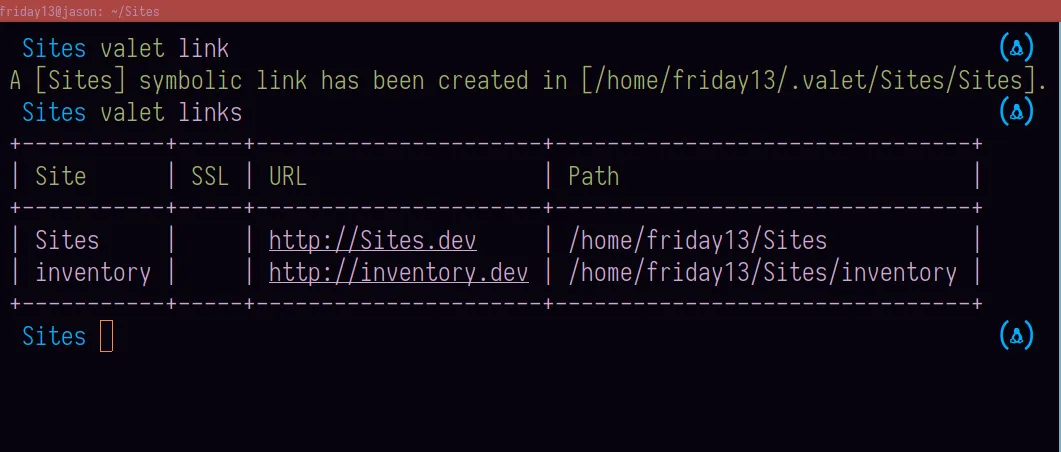
You can create a special link for a specific project:
valet link projectname
To list links:
valet links
🔧 Changing the Domain Extension#
If you want to change the default .test extension:
valet domain .app
To learn the current domain extension:
valet domain
To change the port used by Valet:
valet port xxxx # Replace xxxx with the new port number
🔒 Resolving SSL Errors#
You may encounter SSL errors, especially when using extensions like .app or .dev. To prevent this:
valet secure projectname
To disable SSL:
valet unsecure projectname
📺 Video Narration#
📚 Resources#
🎯 Now you can quickly develop your Laravel projects with Valet and optimize your local environment! 🚀
Comments