Series: phpstorm
Part 2/3What is PSR Standard?#
PSR stands for "PHP Standards Recommendations" and are standards that ensure PHP code is written in a specific format. Since today's IDEs make this process automatic under code refactor, most developers may be unaware of these standards (this situation is generally valid for freelancers). Initially, IDEs could leave the automatic process to the user as standards changed.
Deprecated Deprecated - As of August 10, 2019, PSR-2 standards have been deprecated. PSR-12 is currently recommended as an alternative.
PSR-2 code standards are no longer recommended for use. However, if you're doing this process with an IDE, I don't recommend directly switching to PSR-12 standards, as some problems still seem to exist. You can get more information about PSR-12 here.
Using CS Fixer in PhpStorm#
- Although you previously needed to make extra settings, this feature has been added by default since PhpStorm version 2018.3. PHP CS Fixer Support.
- Install Composer.
- Install Php CS Fixer with Composer:
composer global require friendsofphp/php-cs-fixer
- In PhpStorm settings, go to
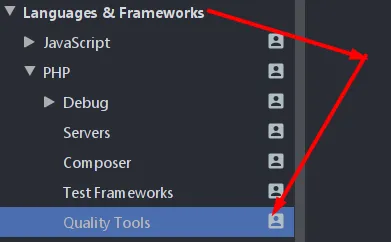
Settings -> Languages & Frameworks -> PHP -> Quality Tools -> PHP CS Fixermenu and specify where CS Fixer is installed.
C:\Users\yourusername\AppData\Roaming\Composer\vendor\bin\php-cs-fixer.bat # For Windows
/home/yourusername/.composer/vendor/bin/php-cs-fixer # For Linux
After writing these paths, you can check the CS Fixer version information by pressing the Validate button.


- Press the
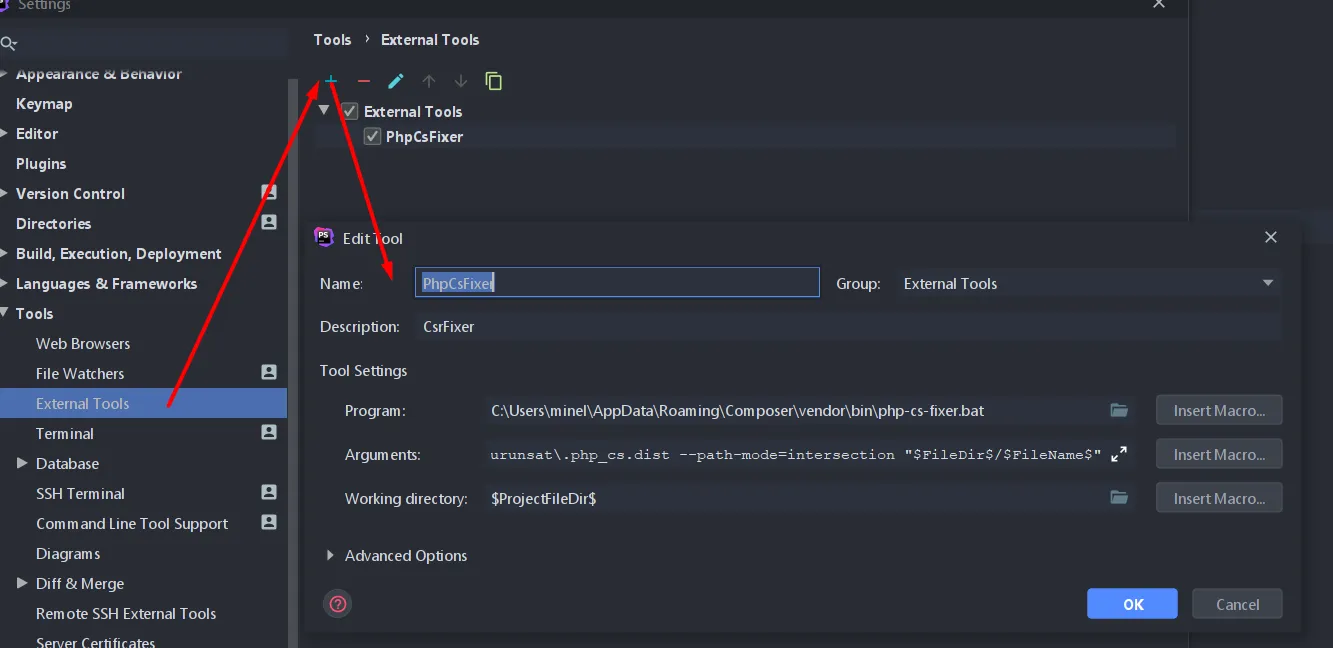
+button inSettings -> Tools ->to add a new tool. Name: You can write any name you want in this section.Description: You can add a description in this section.Program: Write the path where CS Fixer is installed here. I had given the path above.Arguments: Write the arguments you use here. You can learn what the arguments do from Cs Fixer Usage section. Here, instead of writing all arguments, you can show the path of the config file and make all your settings in this file.
fix --verbose --config=C:\xampp\htdocs\urunsat\.php_cs.dist --path-mode=intersection "$FileDir$/$FileName$"
Working Directory: To use this process not only in this file but also in other projects, from the insert macro section
$ProjectFileDir$
You can use the option. This way, you can easily use the CS Fixer process in other projects as well.
You can examine the sample .php_cs file here. For more information, you can check the Cs Fixer Usage section. Also, for another example, you can check Doctrine coding style.
Restart PhpStorm. In the Tools -> External Tools menu, you will see the tool name you added. If you want to add a shortcut, you can add the shortcut you want from the Settings -> Keymap -> External Tools menu. I added the Alt + F shortcut, you can add whichever you like.

Comments