For Linux users, Steam is the indispensable gateway to the gaming world. However, when trying to open games on Debian, you may encounter "wrong ELF class: ELFCLASS32/64", "libgamemodeauto.so preload cannot be preloaded" or FMOD preload errors.
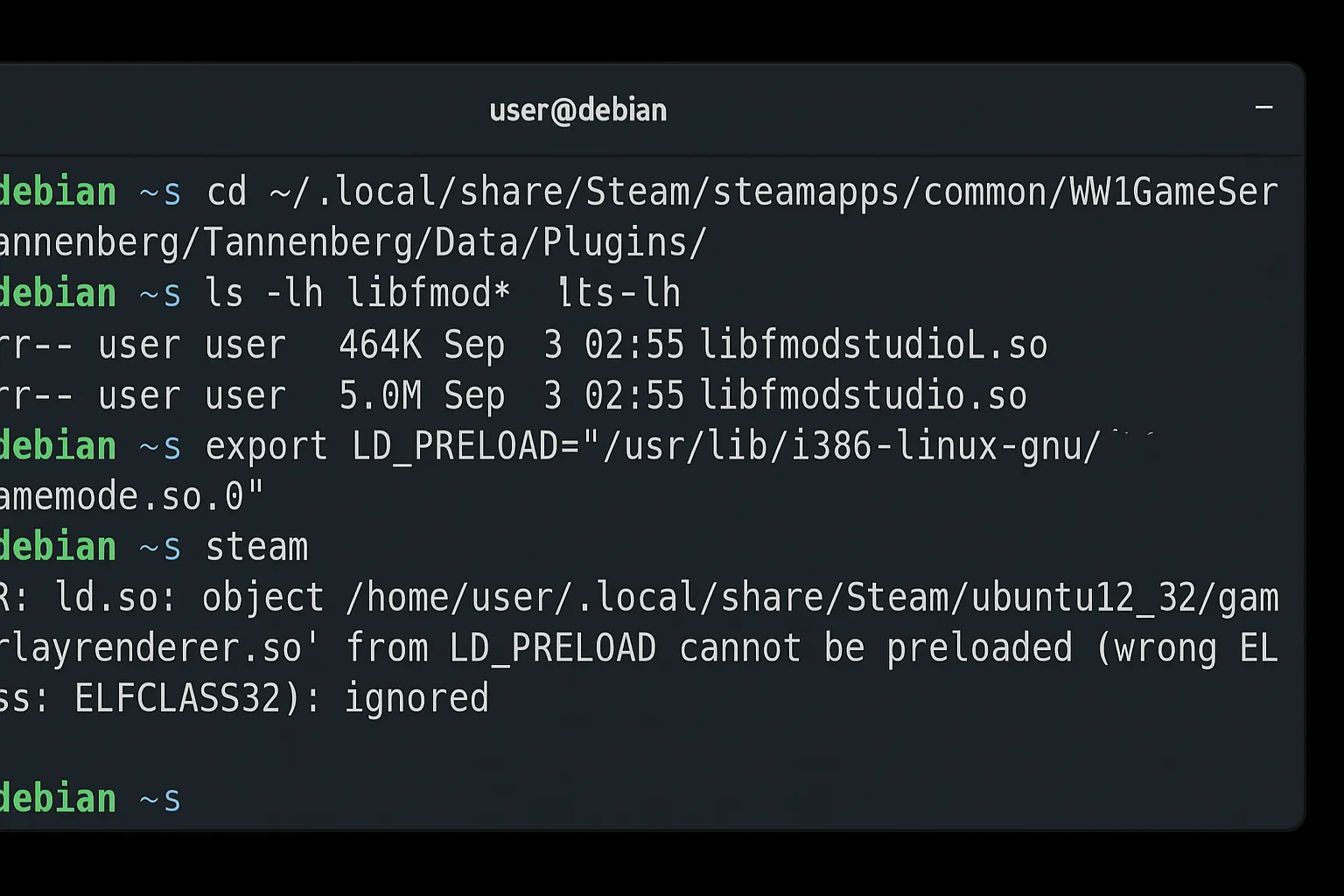
These problems are usually related to missing 32-bit libraries, GameMode package incompatibility or Steam Overlay preload issues.
In this article, we will cover two different methods to solve the problem of Steam games not opening on Debian:
- Installing missing packages via repository
- Manual GameMode installation with
.debpackages - Alternative solutions for FMOD and LD_PRELOAD errors
If you're ready, let's move on to the step-by-step solutions. 🚀
🔍 Symptoms of the Problem#
- Steam opens normally, the game starts but closes instantly.
- The following errors are seen in terminal output:
  ERROR: ld.so: object '/home/user/.local/share/Steam/ubuntu12_32/gameoverlayrenderer.so'
  from LD_PRELOAD cannot be preloaded (wrong ELF class: ELFCLASS32): ignored.

  ERROR: ld.so: object 'libgamemodeauto.so.0' from LD_PRELOAD cannot be preloaded: ignored.
- FMOD errors in some games:
ERROR: ld.so: object '.../libfmodstudio.so' from LD_PRELOAD cannot be preloaded: ignored.
These errors usually prevent the game from running. However, the solution is simple: install missing libraries and correct GameMode packages.
🛠️ Method 1: Installing Missing Packages via Repository#
Missing 32-bit libraries are the most common cause of the problem on Debian.
1. Enable 32-bit architecture#
sudo dpkg --add-architecture i386
sudo apt update
2. Install Mesa and Vulkan libraries#
sudo apt install mesa-vulkan-drivers mesa-vulkan-drivers:i386 \
                 libgl1-mesa-dri libgl1-mesa-dri:i386 \
                 libgl1-mesa-glx libgl1-mesa-glx:i386
3. Install GameMode package#
sudo apt install gamemode libgamemode0:i386
🔧 If Problem Continues: LD_PRELOAD Test Method#
If the game still doesn't open after the above steps, test with the following command in terminal:
export LD_PRELOAD="/usr/lib/i386-linux-gnu/libgamemode.so.0"
steam
Start Steam from terminal this way and try the game. If it works, you can add this line to Steam launcher settings or ~/.bashrc file.
This method is for testing purposes only. For permanent solution, manual GameMode installation (Method 2) is healthier.
🛠️ Method 2: Manual GameMode Installation with .deb Packages#
In some cases, GameMode packages in Debian repositories may be incompatible. In this case, you can download and manually install updated .deb files from Debian Sid repository.
1. Remove existing GameMode package#
sudo apt remove gamemode --autoremove
2. Download required .deb files#
- gamemode (amd64)
- gamemode-daemon (amd64)
- libgamemode0 (amd64)
- libgamemodeauto0 (amd64)
- libgamemode0 (i386)
- libgamemodeauto0 (i386)
3. Install downloaded packages#
sudo apt install -f ./gamemode.deb ./gamemode-daemon.deb \
./libgamemode0.deb ./libgamemodeauto0.deb \
./libgamemode0_i386.deb ./libgamemodeauto0_i386.deb
💡 Additional Tips#
🎵 FMOD Error (libfmodstudio.so preload)#
You may get the following error in some games:
ERROR: ld.so: object '.../libfmodstudio.so' from LD_PRELOAD cannot be preloaded: ignored.
This is generally not critical. It occurs because Steam Overlay or FMOD libraries are trying to preload in the wrong architecture.
To be sure, check FMOD libraries in game directory:
cd ~/.local/share/Steam/steamapps/common/WW1GameSeries/Tannenberg/Tannenberg_Data/Plugins/
ls -lh libfmod*
Using Proton#
Right-click on game in Steam → Properties → Compatibility → Select Proton 9.0-2 and try.
Testing Theme Issues#
GTK themes can sometimes cause errors. Test with Adwaita theme:
sudo apt install adwaita-gtk2-theme adwaita-icon-theme
✅ Conclusion and Summary#
Wrong ELF class, libgamemodeauto preload and FMOD preload errors that prevent Steam games from opening on Debian largely stem from missing libraries.
We learned three-stage solutions in this guide:
- Installing missing 32-bit packages and GameMode from repository
- Testing with LD_PRELOAD method
- Manually downloading and reinstalling GameMode with updated
.debpackages
Both methods solve the problem, but the first is more practical, while the second offers a more up-to-date alternative.
Now you can run Steam games seamlessly on Debian. 🎮🐧
👉 If the game is working but there's no sound, you can check our Steam sound error solution guide for Linux: Steam Linux Sound Error Solution
This was the output I got. We solved the problem by looking at these outputs.
Galip Dede, [3.09.2025 00:18]
steam.sh[3186]: Running Steam on debian 13 64-bit

steam.sh[3186]: STEAM_RUNTIME is enabled automatically

setup.sh[3275]: Steam runtime environment up-to-date!

steam.sh[3186]: Log already open

steam.sh[3186]: Steam client's requirements are satisfied

CProcessEnvironmentManager is ready, 6 preallocated environment variables.

[2025-09-03 00:01:36] Startup - updater built Jun 28 2025 01:05:05

[2025-09-03 00:01:36] Startup - Steam Client launched with: '/home/galip/.local/share/Steam/ubuntu12_32/steam' '-srt-logger-opened'

CProcessEnvironmentManager is ready, 6 preallocated environment variables.

[2025-09-03 00:01:36] Process started with command-line: '/home/galip/.local/share/Steam/ubuntu12_32/steam' '-child-update-ui' '-child-update-ui-socket' '8' '-srt-logger-opened'

09/03 00:01:36 minidumps folder is set to /tmp/dumps

[2025-09-03 00:01:36] Using update UI: console

09/03 00:01:36 Init: Installing breakpad exception handler for appid(steam)/version(0)/tid(3340)

[2025-09-03 00:01:36] Create window

[2025-09-03 00:01:36] Loading cached metrics from disk (/home/galip/.local/share/Steam/package/steam_client_metrics.bin)

[2025-09-03 00:01:36] Using the following download hosts for Public, Realm steamglobal

[2025-09-03 00:01:36] 1. https://client-update.akamai.steamstatic.com, /, Realm 'steamglobal', weight was 400, source = 'update_hosts_cached.vdf'

[2025-09-03 00:01:36] 2. https://client-update.fastly.steamstatic.com, /, Realm 'steamglobal', weight was 900, source = 'update_hosts_cached.vdf'

[2025-09-03 00:01:36] 3. https://client-update.steamstatic.com, /, Realm 'steamglobal', weight was 1, source = 'baked in'

09/03 00:01:36 minidumps folder is set to /tmp/dumps

[2025-09-03 00:01:36] Verifying installation...

[2025-09-03 00:01:36] Verifying file sizes only

[2025-09-03 00:01:36] Set percent complete: 0

[2025-09-03 00:01:36] Set percent complete: -1

[2025-09-03 00:01:36] Set status message: Verifying installation...

[----] Verifying installation...

[2025-09-03 00:01:36] Verification complete

UpdateUI: skip show logo

[2025-09-03 00:01:36] Destroy window


Steam logging initialized: directory: /home/galip/.local/share/Steam/logs


[2025-09-03 00:01:36] ProcessNextMessage: socket disconnected

[2025-09-03 00:01:36] No more messages are expected - exiting

XRRGetOutputInfo Workaround: initialized with override: 0 real: 0xf62af6b0

XRRGetCrtcInfo Workaround: initialized with override: 0 real: 0xf62adf80

09/03 00:01:37 minidumps folder is set to /tmp/dumps

09/03 00:01:37 Init: Installing breakpad exception handler for appid(steamsysinfo)/version(1751405894)/tid(3358)

Running query: 1 - GpuTopology

Response: gpu_topology {

  gpus {

    id: 1

    name: "AMD Radeon RX 550 / 550 Series (RADV POLARIS12)"

    vram_size_bytes: 4294967296

    driver_id: k_EGpuDriverId_MesaRadv

    driver_version_major: 25

    driver_version_minor: 0

    driver_version_patch: 7

  }

  default_gpu_id: 1

}


Exit code: 0

Saving response to: /tmp/steamcJalPC - 71 bytes

steamwebhelper.sh[3374]: Starting steamwebhelper under bootstrap steamrt steam runtime via: /home/galip/.local/share/Steam/steamrt64/steam-runtime-steamrt/_v2-entry-point

steamwebhelper.sh[3374]: Starting steamwebhelper with steamrt steam runtime at /home/galip/.local/share/Steam/steamrt64/steam-runtime-steamrt/_v2-entry-point

Steam Runtime Launch Service: starting steam-runtime-launcher-service

Steam Runtime Launch Service: steam-runtime-launcher-service is running pid 3477

bus_name=com.steampowered.PressureVessel.LaunchAlongsideSteam

Galip Dede, [3.09.2025 00:18]
exec ./steamwebhelper -nocrashdialog -lang=tr_TR -cachedir=/home/galip/.local/share/Steam/config/htmlcache -steampid=3338 -buildid=1751405894 -steamid=0 -logdir=/home/galip/.local/share/Steam/logs -uimode=7 -startcount=0 -steamuniverse=Public -realm=Global -clientui=/home/galip/.local/share/Steam/clientui -steampath=/home/galip/.local/share/Steam/ubuntu12_32/steam -launcher=0 --valve-enable-site-isolation --enable-smooth-scrolling --password-store=basic --log-file=/home/galip/.local/share/Steam/logs/cef_log.txt --disable-quick-menu --disable-component-update --enable-features=PlatformHEVCDecoderSupport --disable-features=SpareRendererForSitePerProcess,DcheckIsFatal,BlockPromptsIfIgnoredOften,ValveFFmpegAllowLowDelayHEVC

/home/galip/.themes/Dracula/gtk-2.0/main.rc:727: error: unexpected identifier 'direction', expected character '}'

/home/galip/.themes/Dracula/gtk-2.0/apps/chrome.rc:50: error: invalid string constant "button", expected valid string constant

/home/galip/.themes/Dracula/gtk-2.0/apps/xfce.rc:77: error: invalid string constant "entry", expected valid string constant

Desktop state changed: desktop: { pos:    0,   0 size: 1920,1080 } primary: { pos:    0,   0 size: 1920,1080 }

Caching cursor image for , size 10x16, serial 113, cache size = 0

reaping pid: 3339 -- sh

chdir "/home/galip/.local/share/Steam/steamapps/common/WW1GameSeries"

ERROR: ld.so: object '/home/galip/.local/share/Steam/ubuntu12_32/gameoverlayrenderer.so' from LD_PRELOAD cannot be preloaded (wrong ELF class: ELFCLASS32): ignored.

Game Recording - would start recording game 633460, but recording for this game is disabled

Adding process 3913 for gameID 633460

gamemodeauto:

ERROR: ld.so: object '/home/galip/.local/share/Steam/steamapps/common/WW1GameSeries/Tannenberg/Tannenberg_Data/Plugins/libfmodstudio.so' from LD_PRELOAD cannot be preloaded (wrong ELF class: ELFCLASS64): ignored.

ERROR: ld.so: object '/home/galip/.local/share/Steam/steamapps/common/WW1GameSeries/Tannenberg/Tannenberg_Data/Plugins/libfmodstudioL.so' from LD_PRELOAD cannot be preloaded (wrong ELF class: ELFCLASS64): ignored.

gamemodeauto:

ERROR: ld.so: object 'libgamemodeauto.so.0' from LD_PRELOAD cannot be preloaded (cannot open shared object file): ignored.

ERROR: ld.so: object 'libgamemodeauto.so.0' from LD_PRELOAD cannot be preloaded (cannot open shared object file): ignored.

ERROR: ld.so: object 'libgamemodeauto.so.0' from LD_PRELOAD cannot be preloaded (cannot open shared object file): ignored.

ERROR: ld.so: object 'libgamemodeauto.so.0' from LD_PRELOAD cannot be preloaded (cannot open shared object file): ignored.

Found path: /home/galip/.local/share/Steam/steamapps/common/WW1GameSeries/Tannenberg/Tannenberg

Game Recording - game stopped [gameid=633460]

Removing process 3913 for gameID 633460

[2025-09-03 00:03:38] Background update loop checking for update. . .

[2025-09-03 00:03:38] Checking for updates...

[2025-09-03 00:03:38] Downloading manifest: https://client-update.akamai.steamstatic.com/steam_client_ubuntu12

[2025-09-03 00:03:38] Manifest download: send request

[2025-09-03 00:03:38] Manifest download: waiting for download to finish

[2025-09-03 00:03:39] Manifest download: finished

[2025-09-03 00:03:39] Download skipped: /steam_client_ubuntu12 version 1751405894, installed version 1751405894, existing pending version 0

[2025-09-03 00:03:39] Nothing to do
Comments