This article is older than 2 years. Some information might be outdated.
Let's take those who want to use it on the Linux side like this: Arch Linux + Debian
Step 1: Editing the Hosts File#
Go to the following directory and open the hosts file with Notepad or any text editor:
File Location:
C:\Windows\System32\Drivers\etc\hosts
Add the following format to the last line of the opened file:
127.0.0.1 eticaret.test
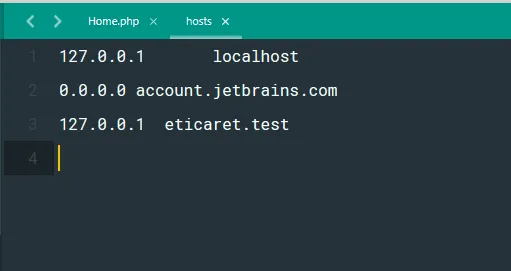
Step 2: Apache Virtual Hosts Configuration#
Go to the XAMPP directory and open the httpd-vhosts.conf file with an editor:
File Location:
C:\xampp\apache\conf\extra\httpd-vhosts.conf
Edit the following settings according to your needs and add them to the end of the file:
<VirtualHost *:80>
    ServerAdmin webmaster@eticaret.test
    DocumentRoot "C:/xampp/htdocs/eticaret/"
    ServerName eticaret.test
    ServerAlias www.eticaret.test
    ErrorLog "logs/eticaret.test-error.log"
    CustomLog "logs/eticaret.test-access.log" common
</VirtualHost>
Step 3: Restarting XAMPP#
Restart XAMPP for your changes to take effect:
- Open the XAMPP Control Panel.
- Stop and restart the Apache service.
- Go to
http://eticaret.testin your browser to test your settings.
Now you can run your projects with your own local domain name! 🚀
Comments